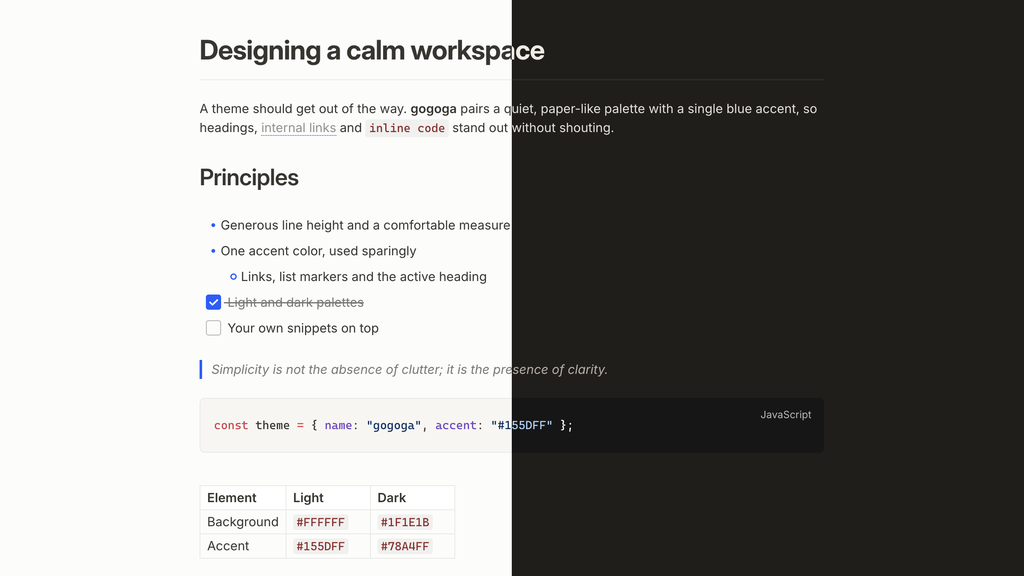
An Obsidian theme that replicates the design language of
Tolaria: Notion-flavored light
palette, warm charcoal dark palette, #155DFF accent, Inter typography, blue
list markers, and an H1-as-title layout with a divider.
Features
- Two palettes ported from Tolaria's design tokens: light
(
#37352Fon white,#F7F6F3sidebar) and warm dark (#E6E1D8on#1F1E1B), accent#155DFF/#78A4FF. The accent follows Settings → Appearance → Accent color, so you can change it without any plugin - Editor typography: Inter, 15px/1.5 scale, 740px measure, Tolaria's heading ladder (32/27/20/17) with negative letter-spacing, H1 and inline titles underlined by a divider
- Details: blue list markers, 18px checkboxes, dotted-underline wikilinks, accent-rail blockquotes, near-black dark code blocks, quiet gray property chips
- Notebook Navigator adaptation: full styling for the
Notebook Navigator
plugin's note list — edge-to-edge rows, Tolaria selection states, quiet
tag chips — via the plugin's
--nn-theme-*API - Companion plugins:
gogoga-iconsswaps Obsidian's Lucide UI icons for Phosphor (the set Tolaria uses), andgogoga-outlinepins a Codex-style heading rail to the edge of the editor — dashes that rise in a dock-like wave under the cursor, with section previews and click-to-scroll.gogoga-youtubemanages grouped YouTube channel subscriptions, recent uploads, read state, and opt-in video notes using public RSS feeds, with a generated native Bases view. - Style Settings support: accent, inline-code, heading and italic colors (per light/dark), body font and body text weight, bold text style (classic, accent color or highlighter, with custom bold color, weight and stroke), text measure, and table column floor, plus opt-in toggles to hide the H1 divider, use one bullet shape at every nesting level, fall back to the system's font rendering (macOS only), highlight the line under the mouse (with its own color), show H1–H6 heading level markers, and a focus mode that fades everything but the paragraph you're writing (in reading view, the one under the mouse). Every toggle is off by default, so the theme keeps its intended look without the plugin. Option labels follow Obsidian's language: English, or Simplified Chinese when Obsidian is set to Chinese.
- Highlighter notes (Style Settings → gogoga → 荧光笔记 Highlighter notes, each item off by default): the title and H1 on a solid marker block, a highlighter stroke across the lower half of H2 and H3,
==highlights==with slanted ends like a real highlighter,<u>underline</u>as a thick marker line, and strikethrough as a red line. Turn each on separately and pick your own highlighter color; works in dark mode too. - Writing aids without plugins: focus mode, hover highlight and heading level markers also switch on with Obsidian's own features — see below.
- Built-in file explorer in Tolaria's style: folder icons instead of chevrons, Tolaria's row size and indent, and a connector line under each open folder — so the theme looks right without Notebook Navigator too.